Step-by-Step Guide
How to Write a
Museum Exhibit Script
An exhibit script is the backbone of every exhibit. It defines what visitors will read, see, and experience — before a single panel is designed or a display case is built.
A good script doesn't just inform. It layers information so that every visitor — from the five-second skimmer to the deep reader — walks away with something meaningful. This guide walks you through the process from blank page to design handoff.
About a 10 minute read
Before You Write a Word
Step 1
Define Your Audience
Before you write a single word, you need to know who you're writing for. This isn't about demographics on a spreadsheet — it's about understanding what your visitors already know, what they care about, and how they'll move through the space.
Ask yourself:
- Reading level. Most museum text should target a 6th–8th grade reading level, even for adult audiences. Simple language isn't dumbing down — it's good communication.
- Prior knowledge. Can you assume visitors have a foundation, or are you starting from scratch? An art museum visitor may know Impressionism; a science center visitor probably doesn't know quantum mechanics.
- Visit context. Families on a Saturday afternoon? A school field trip? Tourists with twenty minutes? Each group reads differently and has different patience for detail.
- Accessibility. Will the text be supported by audio guides, large print, or multilingual options? Plan for these from the start, not as an afterthought.
Curator's Note
When in doubt, write for a curious 12-year-old. If a bright middle schooler can understand and enjoy your text, it will work for nearly everyone.
Step 2
Establish the Big Idea
Every exhibit needs one central idea — a single sentence that captures what visitors should take away. This is your North Star. Every heading, every label, every paragraph in your script should point back to it.
A good Big Idea is:
- One sentence long
- Specific, not vague
- Focused on meaning, not just topic
Weak
"This exhibit is about photosynthesis."
Strong
"Photosynthesis is the invisible engine that powers nearly all life on Earth."
The weak version names a topic. The strong version makes a claim — and creates curiosity.
Step 3
Identify 3–5 Key Themes
Key themes are the supporting pillars of your Big Idea. Think of them as chapters — each one explores a different facet of the central concept.
Why 3–5? Fewer than three and the exhibit feels thin. More than five and visitors can't hold it all together. Research on museum learning consistently shows that visitors retain three to five main concepts from an exhibit visit.
For our photosynthesis example:
- 1 Sunlight as the energy source
- 2 Chlorophyll — nature's solar panel
- 3 The chemical transformation
- 4 Why it matters for all life
Each theme should be distinct — no overlap — and each should connect back to the Big Idea.
Building the Script
Step 4
Build a Narrative Arc
Even though visitors won't always follow a linear path, your script should have a logical flow. Think of it as a story: a beginning that hooks them, a middle that delivers the content, and an ending that sends them away thinking.
Start with a simple outline:
I. Introduction — Hook the visitor, orient them to the exhibit
II. Section per key theme — Each explores one supporting concept
III. Conclusion — Tie it together, leave them with a takeaway
For each section in your outline, write down:
- The one thing this section must communicate
- A potential heading (2–6 words)
- Any objects, images, or interactives that belong here
- How this section connects to the next
Curator's Note
Don't assume visitors will read in order. Each section of your script should make sense on its own. A visitor who starts at Section 3 should still have a meaningful experience.
Step 5
Write in Layers
This is where most exhibit scripts go wrong. New writers tend to produce essays — long, dense paragraphs of body text. But exhibit text isn't a book. It's a layered system where each level serves a different kind of reader.
Percentage of visitors who read each level
What this looks like on a panel
Catching Light
The sun sends trillions of energy packets toward Earth every second. Plants know exactly how to catch them.
These energy packets are called photons. When photons reach a plant's leaves, a green pigment called chlorophyll absorbs their energy — the way a solar panel absorbs sunlight.
Sunlight filtering through a leaf. The green color comes from chlorophyll.
150
max words per panel
45s
target reading time
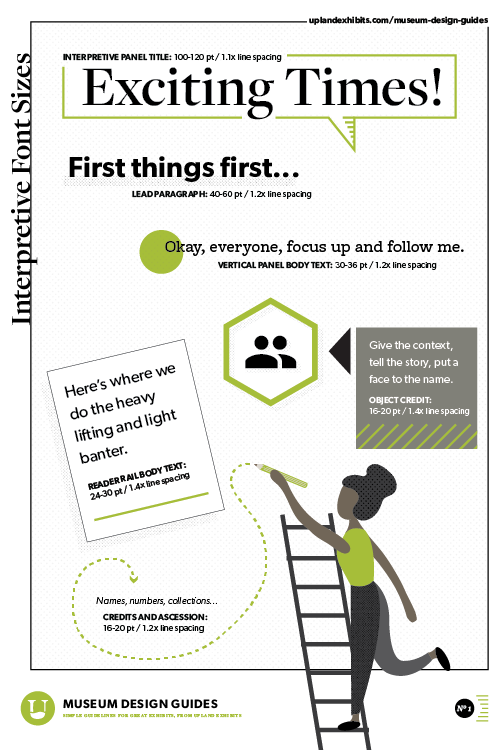
6–8th
grade reading level
Curator's Note
If someone reads nothing but your headings, they should still understand the exhibit. Headings are your most important text — write them first.
Step 6
Add Notes for Your Design Team
The script isn't just visitor text — it's a communication tool between content developers and designers. Throughout your script, include notes about:
- Images you envision — reference photos, illustrations, diagrams
- Interactive elements — touchscreens, flip panels, physical interactives
- Objects and artifacts that belong in each section
- Spatial notes — "near the entrance," "these two panels face each other"
- Pull quotes you want featured prominently
Format these clearly so designers can tell them apart from visitor-facing text at a glance. In the example script below, we use blue callouts for designer notes.
Step 7
Check Reading Level & Word Count
Before you call it done:
Run a readability check. Hemingway Editor is free and works well. Aim for 6th–8th grade. If your text comes back at 10th grade or above, simplify.
Count words per panel. If any panel exceeds 150 words, cut. If you wrote 200 words, challenge yourself to say the same thing in 100. Then try 75.
Read it out loud. If you stumble over a sentence, rewrite it. If you run out of breath, it's too long.
Get a cold read. Have someone outside the project read your script with no context. If they're confused, simplify. If they're bored, cut.
Watch Out
Common Mistakes
Writing like a textbook
Exhibit text should feel like a conversation, not a lecture. Use "you" and "we." Ask questions. Make connections to everyday life. If your text sounds like it belongs in an encyclopedia, rewrite it.
Too many words
The most common mistake — and the most damaging. Long text panels become invisible. Visitors walk right past them. Cut ruthlessly. If a sentence doesn't earn its place, delete it.
No text hierarchy
A wall of same-sized text is functionally invisible. Without clear headings and visual layers, visitors can't scan — and they need to know at a glance what a panel is about. Your most important point should be in the heading, not buried in the third paragraph.
Forgetting the casual visitor
Some people will glance at your panel for five seconds and move on. What will they take away? If the answer is "nothing," your headings need work. Every panel should communicate its core idea even to someone who only reads the largest text.
Handing off raw text without notes
Sending plain text to designers without context forces them to guess about images, layout, and emphasis. A few notes about what you're envisioning — even rough ones — will save weeks of back-and-forth.
Putting It All Together
Complete Example Script
Here's a finished exhibit script applying every principle from this guide. Notice the clear hierarchy, concise text, and designer notes throughout.
Exhibit Script
Nature's Solar Panels
The Science of Photosynthesis
Big Idea
Photosynthesis is the invisible engine that powers nearly all life on Earth.
Target Audience
General public and families. 6th grade reading level.
Key Themes
- Sunlight as the energy source
- Chlorophyll captures and converts light
- The chemical process creates food and oxygen
- Photosynthesis sustains nearly all life
Introduction Panel
The Green Engine
Every leaf on Earth is a tiny factory — powered by sunlight, fueled by air and water.
Right now, in parks and forests and window boxes around the world, plants are doing something remarkable. They're capturing sunlight and turning it into food — a process called photosynthesis. Without it, life as we know it wouldn't exist. In this exhibit, we'll explore how it works and why it matters to every living thing on Earth — including you.
Section 1
Catching Light
The sun sends trillions of tiny energy packets toward Earth every second. Plants know exactly how to catch them.
These energy packets are called photons. When photons reach a plant's leaves, a green pigment called chlorophyll absorbs their energy — the way a solar panel soaks up sunlight. That captured energy is the spark that starts the whole process of photosynthesis.
Caption: Sunlight shining on a leaf. The green color comes from chlorophyll, the pigment that captures light energy.
Section 2
Inside the Leaf
If you could zoom in a thousand times, you'd see tiny compartments called chloroplasts — this is where the magic happens.
Inside each chloroplast, chlorophyll molecules grab the light energy and use it to split water molecules apart. This releases oxygen into the air — the same oxygen we breathe — and frees up hydrogen atoms that the plant will use in the next step.
Caption: Cross-section of a leaf, magnified 400×. The small green ovals are chloroplasts.
Section 3
The Recipe
Photosynthesis is like a recipe. The ingredients: sunlight, water, and carbon dioxide. The result: sugar and oxygen.
Using the energy captured from sunlight, the plant combines carbon dioxide from the air with hydrogen freed from water. The result is glucose — a simple sugar the plant uses for energy and growth. Oxygen is released as a byproduct. That's not a minor detail: the oxygen from this reaction makes up most of the air we breathe.
Section 4
Why It All Matters
Photosynthesis doesn't just feed plants. It feeds everything — including you.
Plants sit at the base of nearly every food chain. Animals eat plants. Other animals eat those animals. The energy at every level traces back to photosynthesis. And every breath you take? That oxygen came from a plant, splitting water molecules with captured sunlight.
Conclusion Panel
Next Time You See a Leaf…
You'll know there's more going on than meets the eye. Inside every leaf, sunlight is being captured, water is being split, and sugar is being built — all to keep life on Earth running. Photosynthesis is happening everywhere, all the time, quietly powering the world.
The Handoff
What Happens Next
Once your script is about 80% complete, hand it to the design team. Don't wait for perfection — the script will evolve as text meets layout.
Expect two to three rounds of revision. Designers will flag sections that are too long, suggest where images could replace text, and push you to tighten your writing. This is normal. This is good. The best exhibits happen when content and design work as one team.
At some point — usually after the first design pass — it's time to stop updating the script document and start working directly in the design layouts. The script got you here. The design will carry it home.